
I pride myself on being fairly organised, which enables me to get through my work week efficiently. However, a little-known fact about me is that I feel like I have some elements of ADD (this is a massive admission for me!). I often struggle to complete a task to its entirety, preferring to branch out and start a new task mid-way. I am extremely forgetful, and it has made me the butt of many a joke in my family and friend circle. Very early on in life, I had difficulty recollecting details from meetings or remembering what was discussed, especially in stressful situations. I had pegged it to ‘me being me’ until I read up on issues like ADD and came to the general conclusion that I may have it to some extent.
Luckily, I learned to cope with these issues in my professional life by taking meticulous notes and trying to keep myself as organised as possible to counter the natural workings of my brain. It is a struggle to maintain a balance between obsessing over things I may have forgotten, obsessing over things I need to do, and being over-organised to overcompensate. My phone was erupting with multiple notes to organise tasks at work, birthday parties for my children, family schedules, doctor’s appointments and a million other things. The last straw occurred when I realised we have such busy schedules that I forgot to tell my husband about an important event in school, so he did not block his calendar. Although I know the responsibility was not on me entirely, the mummy guilt was eating me alive, and the burden of a thousand things to do weighed me down like a ton of bricks.
I was at a junction in my life when I needed a tool (I prefer digital) that could schedule tasks and reminders, create to-do lists and attach resources. I needed an app to dump information in so my brain could accomplish the tasks.
Enter…Todoist.
I downloaded the app and started to use the free version. As is my nature, I became obsessed with it and paid for the app within a day because I loved it. I spent hours organising and adding tasks to my calendar while my colleague Manisha laughed at me, claiming that I could have completed my tasks in the time spent organising them!
No matter. The joy of organising. Nothing can beat it.
Since Todoist is my new obsession, I wanted to share a few tips so that others could profit from my hours of research (at least to give you a head start on deciding whether this app would benefit you). Here we go!
Adding Projects
Projects are nothing but domains in which you can categorise your tasks. For example, I have projects for the following-
- The school magazine
- The reading programme
- Family schedules
- Birthday parties
- Travel checklist (for holidays)
- Classroom work
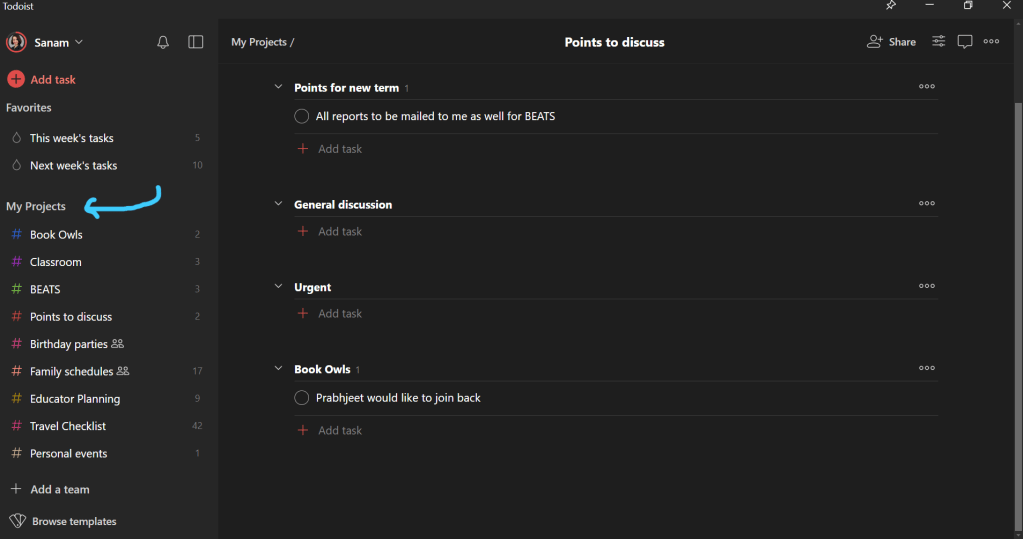
My projects are increasing rapidly, but I am stopping myself from adding too many because I do not want to clutter my dashboard. These over-arching projects give you quick access to tasks that need to be completed under each one, and the number in front of the project indicates the number of tasks left to do.
Sub Tasks Under Projects
I create multiple sub-tasks under each project to keep track of the tasks that need to be done under that category. These sub-tasks help me keep track of each category, keep them separate, and allow me to give them balanced attention.

Assigning priorities
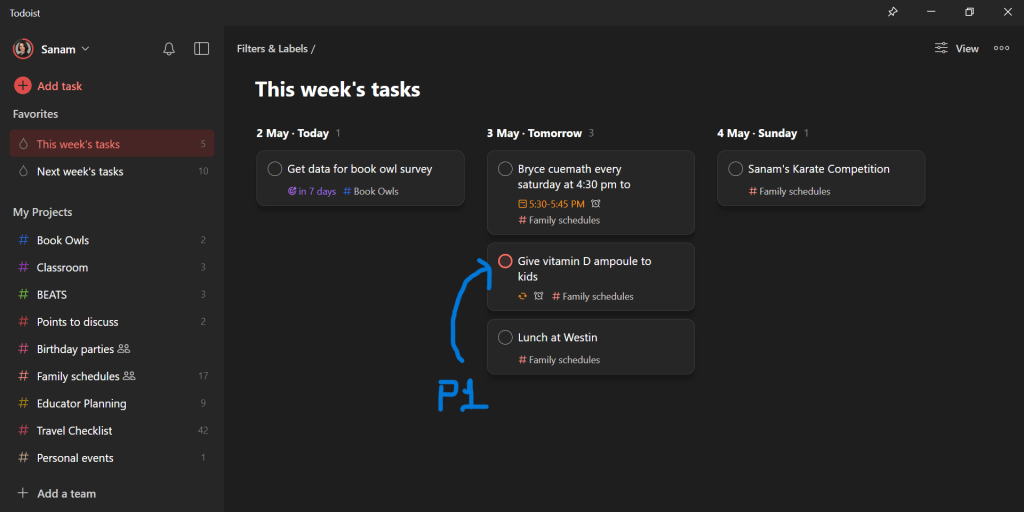
You can assign each task a priority (or none) from P1 to P4, with P1 being the highest priority. These tasks will appear in red to draw your attention.
Deadlines and reminders
You can assign deadlines for each task to keep track of everything that needs to be done. The ‘Do Date’ is the start date of a task, and the ‘Due Date’ is when the task should be completed. These will appear according to the set dates in your calendar to ensure these tasks are on your mind at the right time.
Reminders help me remember what needs to be done. I use this feature mainly for family events, children’s classes, and appointments. Since I have multiple deadlines in each academic area and personal project, it helps when I prioritise and flag tasks that must be completed on a particular day.
I like to complete these tasks the minute I reach school to clear everything in red on that day. Then, I take on smaller and less critical tasks during the day without feeling overwhelmed.
Filters and different views
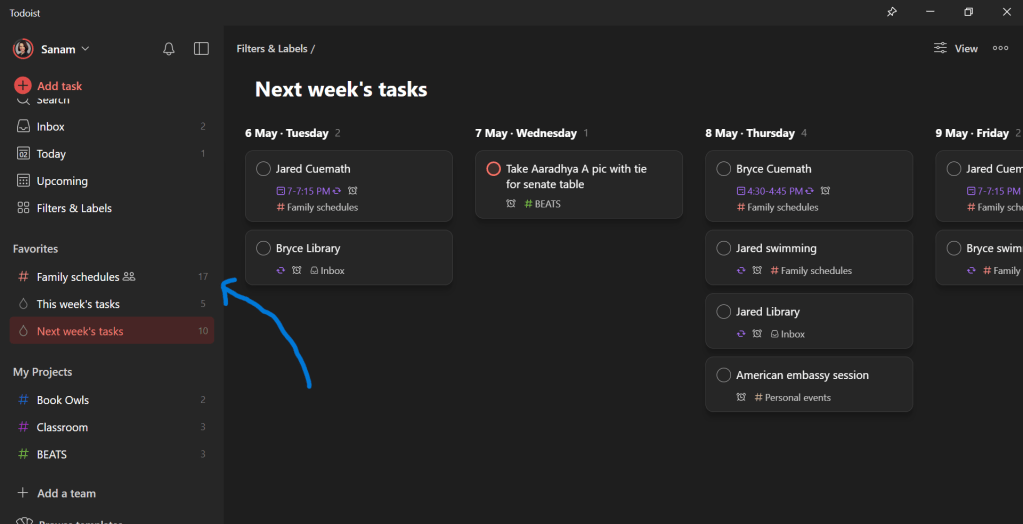
You can set filters to see whatever period of tasks you want to ensure you get an idea of your productivity for the near future and the upcoming weeks.
The AI tool can set your filter according to your needs, so you do not have to rely on built-in filters.
There are also a variety of labels that help you categorise tasks for easy sorting. However, I must admit I have not used them as I am currently delighted with my level of organisation rather than overcomplicating matters.
Set your filter to show you all your deadlines for the next few days, the week ahead, or even a fortnight. You will be able to see precisely when a homework sheet is due, what correction work needs to be done with which deadline, schedule assessments, send emails on time, and more.
Sharing Projects with Teams or Individuals
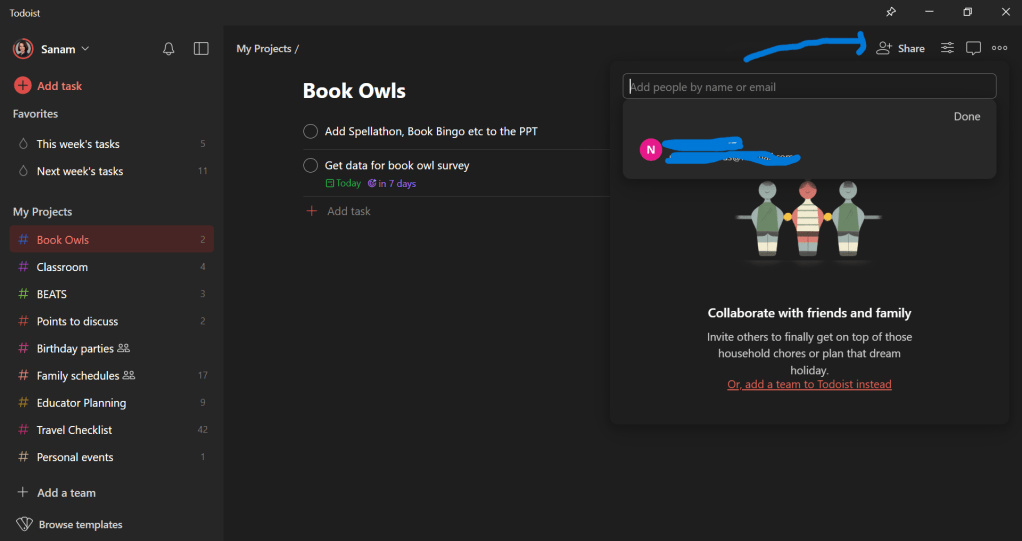
My biggest grouse with my old organisation system was being unable to keep my family updated with schedules. Todoist allows you to share your projects with a team or with individuals. Settings can be changed to view or edit projects. I have a great sense of satisfaction now that we are on the same page even when we are apart or do not get to communicate often.
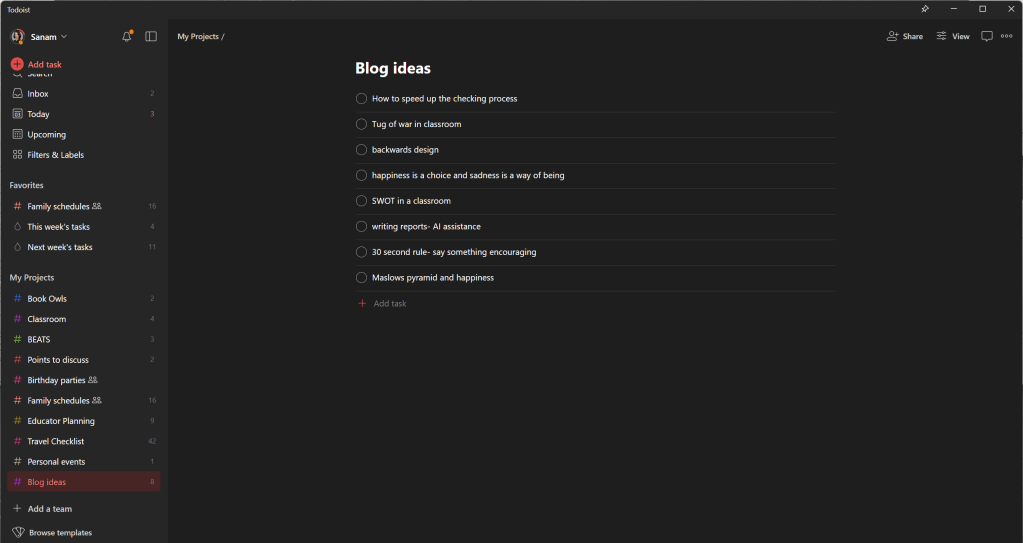
Putting Down Ideas-Not Just Tasks
You can also record ideas as tasks. Just don’t add reminders, deadlines or dates, and you have yourself a place to ideate and store thoughts you may want to pursue at leisure!
Paid Version vs Free Version
I was a wee bit hasty when purchasing the app on my second day of use (another excellent quality of mine—impulsiveness). The minute I got into the app, I was instantly hooked, going overboard researching and reading reviews online. The nominal fee of Rs 2100 for a whole year was very attractive, as I hoped to unload all of my mental burdens into this fantastic app.
I love the intuitive AI language model, in which I can use hotkeys to set a task no matter where I am on the desktop. I can quickly type the task with the date in shorthand, and the AI will understand and put it into my calendar.
For example, I can type ‘Bryce’s swim class ev Tue 5:30’ am instead of clicking and scrolling, which makes it work faster.
This intuitive feature and the calendar view (which I can personally live without) are only available in the paid version.
The paid version supports more projects and templates, which aren’t necessary if you can stay organised with less. I tend to go overboard and pay for apps for full productivity, and I have had no regrets with this one.
In conclusion, the free version will work fine if you’re starting with a digital organiser.
Takeaway-
For someone with a slight (maybe moderate) OCD who gets sick pleasure out of ticking off tasks, the popping sound when a task is completed gives me an endorphin rush.
I love the app’s connectivity with other interfaces, such as Apple and Android. I can also use Siri to add and check tasks from my watch or phone.
I also love colour-coding my projects. It is a minor thing to most, but it gives me a surge of happiness to assign project colours.
There are many other great features, such as templates, adding labels, and a calendar view. I do not use these features too much (yet), but it all depends on your working style.
All in all, I am thrilled to be able to clear the clutter in my brain. It allows me the space to focus my energy on actually being productive rather than organising a cluttered workload. The visual organisation in this app prevents me from being overwhelmed and has given me a lot of peace. What more could you possibly want?





 Looking into the Review Mirror
Leave a reply to Shalini Ranjan Cancel reply